Most small business owners understand they need to write and publish blog posts but they don’t know where to start.
And, suddenly, they’re back in 7th Grade English class feeling like they can’t write.
I get it.
Many times we just need a coach.
The blogging and topic prompts in the Launch With Words Starter Pack are just that. Me, sitting next to you, giving you step-by-step instructions on what to write about, which questions to answer, and how to correctly format your blog post so you can hit publish.
I’d invite you to watch the 2026 video I created today for step-by-step instructions on how to work with the prompts, even with ChatGPT. Because getting started is the real problem. You know what to write. That’s why you have a business.
Want a Better Way to Write?
Blogging doesn’t have to be something you put off. It can be something you use — to clarify your thinking, connect with your audience, and grow your business without burnout.
If you’ve ever stared at a blank page and wondered what to write, I’ve been there too.
That’s why I built Launch With Words — to give you a starting point that feels intentional, not generic. You can begin with the free Starter Pack, which includes prompts you can use right inside WordPress or your favorite writing tool.
If you want help moving from idea to first draft without overwhelm, you can grab it here:
Pre-packaged, ready-to-install, blog posts gives more value to your website builds at launch — especially if you can schedule the articles to publish in the future.
If only there was a solution.
I was so excited when someone replied,
“If only!”
So when I continued the conversation, it ended up with the myth of being penalized by Google.
It’s not a new issue. When I tell people about what Launch With Words is, the problem it solves, most people are super excited. But then they find out they are purchasing a content pack and they ask me:
“What about Duplicate Content?”
Can we do a story first? Hear me out.
Let’s go back to Bridget as the Director of Marketing for ThoughtHouse (2015-2017), an advertising agency in San Diego that specialized (they’ve since closed) in FranDev.
Franchise Development is getting people to purchase a franchise (or a group of them, ideally). We worked with Paul Davis Restoration, Sports Clips, WIN Home Inspection, and more. We would build their websites, handle their social media, write blog posts, and even teach their franchisees how to market themselves.
One of the problems franchisees have is syndicated content. You see, most of their websites are really a multisite. Blog posts would appear, but the franchisee couldn’t edit it — at all. They couldn’t localize the copy or anything. It was super generic, bland copy. So even though they are the business owner, they really couldn’t publish on their company website.
Now, let’s fast forward in time when Bridget was the vendor for RooferMarketers.com (a 7-figure agency a la Josh Nelson, that was since acquired). My role for this marketing agency (because I have a background in roofing) was to write templated blocks of copy for our internal library.
When we built a website (one of three templates) we would add the templated block of copy for the service they provide. If they do metal roofing, copy/paste. If they do shingles, copy/paste. If they do siding, copy/paste.
Copy. Paste.
That sounds a lot like duplicate content.
Do you know what the difference was?
The context of the website. The demographic. The geographic service areas.
That’s how I got the idea of Launch With Words. Why not make templated articles that would help the business with content to share on social media? I mean, I’m always writing for my clients because they need content to share on social media.
If this sounds like a product you think would help you or someone you know who builds websites, would you do me a favor and share this?
You’re doing a lot to keep a single woman in business. I appreciate you.
Full Video Transcript
Bridget Willard (00:01): Hey there, it’s Bridget Willard here. Get a lot of questions from clients. “What do I write about for my small business blog?”
Bridget Willard (00:10): That was the whole reason why I came up with Launch With Words. There is a very, a free version, if you haven’t heard about it, that’ll gives you blogging prompts.
Bridget Willard (00:20): So you need this plugin from the WordPress repository, a plugin directory. My good friend Ronald Huereca built it for me. It has a lot of great reviews. It’s still going and it has a lot — a helper.
Bridget Willard (00:38): So you get the Starter Content pack and you need to download this plugin. So let’s go to your website. Here’s my website. I just spun up from, from TasteWP, which is a great, a great little, great little way to taste WordPress.
Bridget Willard (00:58): Let’s go to my dashboard. I’m gonna go to plugins, install plugins. Okay, thank you. Okay, I got it. I’m gonna install Launch With Words. I’m gonna, it’s not here, right? So I go add plugin, “Launch With Words.”
Bridget Willard (01:25): The original reason for Launch With Words is to apply the prompts from my book, “If You Don’t Mind Your Business, Who Will?” into blog drafts that will help you and prompt you along the way.
Bridget Willard (01:41): So I could go install now. Perfect. I’m gonna activate it. If you need to know how to do it, there’s a video right here. The, this is where you import your content packs, right here in this tab.
Bridget Willard (02:04): So you need the author. And usually I create, I, I recommend that you create a user that is not just admin ’cause it looks ugly, right? So I’m gonna change it to my name, Bridget Willard. And I’m gonna have the name display as Bridget Willard. That’s important ’cause that will, that’s how the author will look. Update my profile.
Bridget Willard (02:37): Now, for the categories, let’s pretend that I am a flower shop. So I’m gonna go in here to post and I’m go to go, I’m going to go to categories. Because the blog post prompts will come in and import as a category. So let’s talk about Floral design. Let’s talk about Services. Floral delivery, Floral Services.
Bridget Willard (03:19): Okay. So we have those and we’re gonna make one of ’em a default. It lets us, (where?), I think that’s in the settings. Yep. Settings, “Florall Services” is gonna be my default.
Bridget Willard (03:44): Oh, one other little tip, tip if you’re a new blogger, oops, is, excuse me, um, is to change it. To change your permalinks. So important. I don’t even know why this isn’t the default, the post name. Just make it the post name. You’ll be so happy you did. It’s a SEO thing. I really don’t know why date and time is the default for WordPress.
Bridget Willard (04:13): So let’s go back to posts. Launch With Words is about blogging. So it’s always under posts.
Bridget Willard (04:22): So I need my free starter pack, right? So download my free starter pack.
Speaker 2 (04:29): It’s gonna take you to my website, bridgetwillard.com. Oops. Starter. Oh, there’s a starter pack in German. And we’re gonna take, we’re gonna take the regular starter pack. It’s free. Okay? I am gonna check out. Get now. Oh, I have to do this. There’s my receipt. The receipt will tell me how to get it. It’s downloading.
Bridget Willard (05:23): It’s A-J-S-O-N file. Or Jason, JSON. I’m really not sure how you pronounce it. I should know. I always, I always thought it was json, but I hear other people saying, Jason.
Bridget Willard (05:33): So let’s go back to my, my little website that I’m making. I’m gonna import a contact pack, author, floral Delivery. See, ’cause I made that the, I’m gonna change. I’m gonna change it to Floral Services. Choose file.
Bridget Willard (05:55): Now, this part, it depends on what kind of computer you have. Windows Mac, I’m on a MacBook. It automatically goes to my downloads. So I know that that’s where it is. LWW Launch With Words Starter Pack 2025. I updated it last year. Look, 12 posts have been created. It took seconds.
Bridget Willard (06:17): Now, now I go to all posts and here we have our posts. They’re all drafts. So if I went to my blog, which I need to actually make a blog. I forgot to tell you that.
Bridget Willard (06:31): This is another weird thing about WordPress. You just need to make a page that’s called “blog.”
Bridget Willard (06:41): Don’t do anything to it and just publish it. Then right now it, it just has nothing on it. So let’s go back to our dashboard. There’s one more little setting, and this is on WordPress because it, it’s just so weird. Let’s go to general. Um, oh, it’s Reading, right? Yeah. Homepage displays your static posts, your latest post blog posts or static page.
Bridget Willard (07:19): So my homepage is gonna be the sample page, and my post page is gonna be my blog. And I’m gonna save that. So now when you go to my site, I have my sample page, right? And then if I click blog, I have my blog posts, which always has “Hello World.”
Bridget Willard (07:38): There are millions of websites that have Hello World . It’s duplicate content.
Bridget Willard (07:46): Alright, let’s, let’s go back. So let’s go back to our dashboard. This is all under 10 minutes. We’re at seven minutes.
Bridget Willard (07:57): Go to our posts. Let’s go to January. It did, it did also email me. Oh no, that was something else. Sorry, you don’t need to see that. Where are we?
Bridget Willard (08:23): Let’s go to January. I’m gonna edit. So I have some choices. So I have some choices. I have the draft blog post with questions I’m gonna answer or an AI prompt.
Bridget Willard (08:45): Then there is a checklist. Grab yourself, a featured image. Create one on Canva. Just go through the link. Do your meta description, your ShareThrough like this. These are like pro tips right here.
Bridget Willard (09:01): So if I wanna do an AI prompt, I can select this. If you use Atarim or Bertha.ai, you can do that. You can also go to ChatGPT and I’m going to paste that prompt in there.
Bridget Willard (09:27): Now, the, the regular, the regular part is, “The beginning of the year is a great time to write about starting new habits. Topics for the beginning of the year should be more than just a post about your business goals or personal real solutions. Challenge yourself to create content that’s useful all year round and or highlight products, new or old that your company’s offering. How does your product or service factor into the customer’s journey? How does the customer use your products or services in a new way? How does your product solve a customer’s problem?”
Bridget Willard (10:02): That’s the, that’s a great new year and you don’t have to do January in January, but this is a suggestion. Let’s go back to ChatGPT. Which service should we highlight? “So say I am a florist in San Diego, California, and my, and the service I want to highlight is funeral arrangements.” I mean, maybe that’s my big thing. Who knows?
Bridget Willard (10:51): So you can go with this, right? You can pick the ChatGPT. So if that’s your way, that’s what you wanna do, you can definitely do that. Okay? Okay. I’m gonna copy this. Oops. But you’re gonna, you’re gonna select it all. Oops. We wanna, I, I don’t wanna delete the checklist yet, but I do wanna fix that and I wanna change the title from January Blog post to the title that ChatGPT gave me. I’m gonna delete this ’cause that’s just, that’s one of the things you’re gonna wanna do is make sure your slug isn’t, doesn’t say January, right?
Bridget Willard (12:25): So let’s just publish it for now. It doesn’t have a featured image or any of that yet. Let’s view the post and there it is. There it is.
Bridget Willard (12:39): So, it’s so easy to use Launch With Words to help you write. If you wanna do it yourself, that’s fine, but maybe if you’re using chat GBT, it gave you something to go off of and I would highly consider, uh, recommend that you would edit this.
Bridget Willard (12:57): Anyway, my name is Bridget Willard. I’m the owner of Launch With Words, a small business copywriting plugin that helps you write one blog post every month, gives you topics. It’s totally free. I would love it if you would try it and I’d love it if you would review it. Bye.
Let’s be a bit frank about the number one objection I hear about Launch With Words: What about duplicate content?
“Duplicate content. There’s just something about it. We keepwritingaboutit, and people keep asking about it. In particular, I still hear a lot of webmasters worrying about whether they may have a ‘duplicate content penalty.‘
Let’s put this to bed once and for all, folks: There’s no such thing as a ‘duplicate content penalty.’ At least, not in the way most people mean when they say that.” Google
How Many Different Brands of the Same Thing Do We Need?
My grocery store sells nine different brands of plain yogurt. Nine. How many types of plain yogurt do we need? One.
They sell fifteen different brands of ketchup, twelve different brands of mustard, and about twenty different brands of olive oil too. How many do we need? Honestly? How many would get the job done? Probably one of each.
Most people use Heinz ketchup. 150% more expensive than other brands – it’s still all ketchup though.
How many different colas are there? Aren’t they all just fizzy drinks?
There are more than 3,000 different brands of mustard in the world!
I don’t know how many olive oil brands there are but Spain alone has 93!!
50 different brands of sandwich bread, 85 different yogurt brands, 100 different types of beer … !!!
We live in a world of duplicate content, and we pay top dollar so it has a different label.
Bridget Talks About The Real Problem Service Businesses Have
If you want the full walkthrough—including real-world examples, Google quotes, and why this fear keeps resurfacing—watch the video here:
Launch With Words vs the Duplicate Content Objection
Duplicate Content Is Not Your Problem (And Never Was)
If you’ve ever hesitated to publish content — or buy a Launch With Words pack — because someone warned you about a “duplicate content penalty,” this post is for you.
In my latest video, I break down why this objection keeps coming up—especially from web developers — and why it’s largely misplaced fear.
Here’s the short version:
Most small business websites don’t have enough content for duplicate content to even be a concern. Also, Launch With Words isn’t so wildly successful (yet) that duplicate content would be a factor. But thank you for thinking that.
Additionally, Launch With Words was never meant to be the only content on that website. That’s why it’s called Launch (as in launch the website) with Words (with blog posts).
The Real Problem Small Business Websites Have
The vast majority of local business sites:
Have no blog at all.
Have nothing new to share on social media.
Give visitors no reason to trust, explore, or convert.
As a WordPress developer, this probably doesn’t surprise you. When was the last time you built and launched a website with blog posts?
Potential customers still check websites to validate their searches and referrals.
They get a referral. They scan a QR code on a business card. They Google the business name. And when they land on a site with no content, no updates, and no proof of expertise—it’s a dead end.
Service-based businesses have a long-standing reputation of being fly-by night. Consistently publishing articles, shows customers that they’re serious about their contracting business.
This is where Launch With Words comes in.
What Google Actually Says About Duplicate Content
This fear didn’t come from nowhere—it came from misunderstanding.
Google has been clear for years that “here is no such thing as a duplicate content penalty.”
What does matter is intent. If your client is a real business, they have nothing to fear.
Google only takes action when duplicate content is:
Deceptive
Manipulative
Designed to game search rankings
In other words: spam.
Why Launch With Words Is Not a Duplicate Content Risk
Launch With Words content is:
Not syndicated
Not auto-published
Not meant to be the only content on a site
Instead, it:
Lives in drafts
Is editable and localizable
Gives business owners something to publish, share, and build on
Think of it as a content foundation, not a content ceiling.
It helps:
Signal freshness and authority
Inspire follow-up posts, videos, and case studies
Support Google Business Profile posts and social sharing
The Hypocrisy of the Duplicate Content Argument
Let’s be honest for a second.
Product descriptions are duplicated across retailers
News outlets publish the same AP content
Service businesses reuse the same core explanations
Nike doesn’t rewrite shoe descriptions for every store.
And yet—no penalty apocalypse.
The risk is not publishing content.
The risk is publishing nothing.
Why This Matters for Web Developers
Launch With Words isn’t just content—it’s a business lever.
It turns a one-time build into an ongoing relationship.
And yes—this content is written by humans (me + Warren Laine-Naida), includes strategic outbound links, real calls to action, and topics pulled directly from real search behavior.
Launch With Words Is Repositioned for 2026
I’ve updated the fee for multisite (just $200). There is an affiliate program. There are bundles.
If you have questions about Launch With Words, content strategy, or how to use this responsibly for clients, you can always reach me at hello@bridgetwillard.com.
Your Friend, Bridget
Full Transcript
Bridget Willard (00:02): Hey there, it’s your friend Bridget Willard here. I wanna talk a little bit about duplicate content. So it seems that a lot of people think about duplicate content from strictly, I’m gonna search this one thing on Google and maybe find some answers, right? So most websites aren’t even found in the first page results. So duplicate content is not your problem.
Bridget Willard (00:31): Your problem is when you have a website, it has no blog at all. It has nothing for you, as the business owner, to share on Facebook, Pinterest, Reddit, LinkedIn, Twitter, X, et cetera.
Bridget Willard (00:52): You people get referred to you, they get your business card, right? Get your business card, and they’re like, I wanna go look at this website. Or they, maybe there’s a QR code on the back. I, I collect all these web, all these business cards because I think it’s really fascinating.
Bridget Willard (01:14): Now, these two were from a, a Fair Co. Cookies and Cupcakes. They have Facebook pages, Laura’s Cup, cup, Cakery Cupcakery has two as LinkedIn, I’m sorry, Facebook and Instagram. But there are no, there’s no website unless that’s what this QR code does. I have no idea the same, same with this, just a phone number. And that’s fine when you’re starting out.
Bridget Willard (01:47): But you know, if I get, if I get a business card or if I see you, or if I see an ad for you, especially if you’re a home service, a handyman, I wanna go check you out. I wanna see what other work have they done. Do they have reviews on Google Business?
Bridget Willard (02:04): So the idea of Launch With Words is that the developer will buy these packs or mini packs so that the website has some content on it that’s publishing. Either pre-published, back published, some published, forward publishing, but it is never meant to be the only content on that website. Instead, it’s meant to show the client that these blog posts are helping. They give them something to share on social media. There is something publishing, which is a, an authority signal to Google, and also it helps inspire them to write more content.
Bridget Willard (02:51): If you use the Starter Pack along with one of the other packs, you’ll see there are 12 prompts, one for each month that asks the business owner questions. It also encourages them to make video, do case studies. And there are AI prompts that work very well with ChatGPT.
Bridget Willard (03:11): So I think in 2026, not being afraid of AI, not being afraid of random penalties, none of these small businesses are ever going to have the volume that’s going to appear where duplicate content is their problem.
Bridget Willard (03:30): Instead, what we’re, what I wanna share your, I’m gonna share the screen. Okay, here it is. Let’s, let’s share this. Duplicate content on a site. Here we go.
Bridget Willard (03:51): “Duplicate content on a site has no grounds for action on that site unless it appears that the intent of the duplicate content is to be deceptive and manipulative to search results and to manipulate search results.” Google.
Bridget Willard (04:07): So, in other words, spam. Okay? So this is from 20 2008.
Bridget Willard (04:15): “There’s no such thing as a duplicate content penalty.” right? But it also says, “don’t create multiple pages, subdomains or domains with substantially duplicate content.”
Bridget Willard (04:25): Now, this is something SEOs do all the time. You’ll look for a lawyer maybe in Corpus Christi, and you see these lawyers and it has a page just for Corpus Christi. And then their offices are where? Houston, San Antonio, Austin. They’re not in Corpus Christi. So these kinds of service pages where they randomly have this random page instead of just listing the cities that you serve, instead, you’re doing something that is really not working.
Bridget Willard (05:00): It’s also about local. So what if I say roofer near me?
Bridget Willard (05:10): Now I have some sponsors re sponsored results, I have more sponsored results, and now I’m getting to the maps. Bayfront Roofing, uh, we know them. They are on TV all the time. They’re in Walmart. Phillips Roofing, all this stuff.
Bridget Willard (05:29): If you go to a a, you know, a website like this, you would expect to see blog posts that would help you decide about maybe what kind of materials to use, right? (That’s a lot of popups.) Now. They buried the blog.
Bridget Willard (05:58): “What to consider before having a skylight installed.” Like these are actual, actual questions. So if the customer’s like, yeah, I saw Bayfront Roofing at Walmart and I talked to them, and now I’m kind of considering, ’cause really my hallway doesn’t have a lot of natural light, or my bathroom doesn’t have a lot of natural light. I know we get hail here. I know we have wind storms.
Bridget Willard (06:21): Is that something that is important? You know, so December, 2025, they just added this. They’re gonna talk about it more natural light improvement in health, blah, blah, blah, blah. You get the point.
Bridget Willard (06:35): So, if you have a website that has some of this content, you, the great thing with Launch With Words is you can edit it. It just gets imported into your draft folder. So you can localize it, you can change the call to action.
Bridget Willard (06:52): It, it’s not syndicated content like every single newspaper has with the AP. Talk about duplicate content.
Bridget Willard (07:01): How about product pages? Nike’s shoes have the same description. No, no matter where they are.
Bridget Willard (07:08): The point of it is for you as a web developer to add in some profit to your service plan, not just website hosting, not just website maintenance, but content. Content that they can use to share on Facebook, to share on Google Business profile, and everywhere else.
Bridget Willard (07:31): And you could offer a service to localize it for them. Another opportunity for you to upsell.
Bridget Willard (08:14): Now, why am I still talking about Launch With Words? Because I believe in this product. I believe in its ability to help you gain a better ground with your clients, that it’s not this one and done build the website. Keep the client for maintenance. Take control of the content. It’s not written by AI, it’s written by me. It’s written by Warren Lane-Naida. There are outbound links, there are calls to action. There are non-competitive outbound links strategically put there for SEO. The questions and the topics are top some of the top topics in a Google search. These are strategic, they’re not fluff.
Bridget Willard (09:00): So I would love to have you go to LaunchWithWords.com. You can find it on my site in the footer. I’ve repositioned it. I’ve changed the multi-site pricing to only $200 as an add-on.
Bridget Willard (09:14): This is a great idea. You know how to build websites, go pitch roofers, use my content pack. It comes with a free template that I built for Roofer Marketers that they use. They have now been acquired for the exact Mad Libs of home, about, and services. This is a great, great deal. If you have $500 and you’re willing to put some effort into building websites for local contractors.
Bridget Willard (09:43): If you have any questions, reach out to me at hello@bridgetwillard.com.
Bridget Willard (09:47): Thank you for listening. I believe in this product and I’m using it to build websites here too. So why aren’t you? Bye.
B2B SaaS Founders are often overwhelmed with their own workload as CEO, CFO, and CIO. Taking the time to publish on LinkedIn seems frivolous in comparison. But it’s crucial to brand building which is vital for sales.
Also, if you’re taking the time to post on LinkedIn about your company, you may as well also publish an article there as well.
Why should you make time out of your busy schedule to publish on LinkedIn?
The short answer is for visibility, thought leadership, brand authority, and off-page SEO.
Building Visibility On LinkedIn
If you’re a B2B founder, CEO, or Marketer, you need to be on LinkedIn. It’s not outdated, it’s not becoming Facebook. It’s where people network online. CEOs aren’t typically in Reddit looking for customers and investors.
Networking on LinkedIn as an intentional exercise (even before and after conferences) is a great way of making it easier to hold meaningful conversations in person. Over 60% of the audience on LinkedIn depends on it for “event information and company news,” reports Statista.
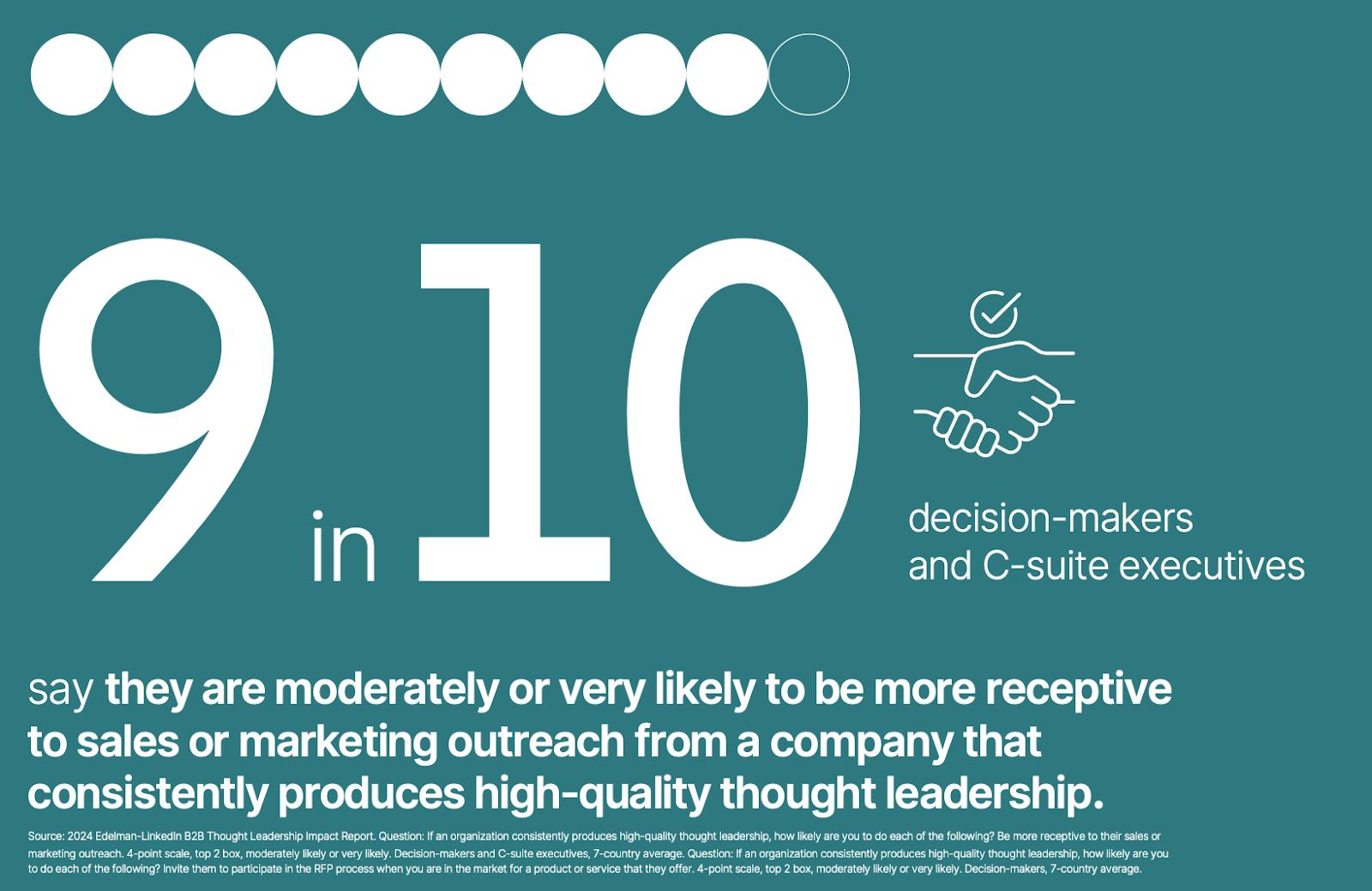
Visibility that makes the sales process easier? Yes, please! Even better, 90% of the decision makers and C-Suite who consistently read your content are obviously more interested in a sales pitch. Warming up leads by publishing articles on LinkedIn seems like a no brainer.
“9 in 10 decision makers and C-suite executives say they are moderately or very likely to be more receptive to sales or marketing outreach from a company that consistently produces high-quality thought leadership.”2024 Edelman-LinkedIn B2B Thought Leadership Impact Report
If you knew that over 50% of decision makers and C-Suite members spend over an hour a week reading thought leadership articles, would you change your strategy? It’s important to post consistently in order to break through the noise.
“Aim for five LinkedIn posts per week, creating a steady rhythm of content.” EverythingDesign
And while you’re doing that be sure to form new connections and reply to other people’s posts. You can easily fit this into your schedule with my 3-2-1 Method.
“54% say the piece of thought leadership got them to realise there were other suppliers they could work with that had a better understanding of the challenges their organisation was facing.” Di Mace
Building Brand Authority on LinkedIn
Building brand authority on LinkedIn is important for any business; for startup SaaS companies – it’s crucial. You’ve built the Uber for [Industry] or the Google for [Industry]. People have to both want a new solution and know you exist.
Writing about problems that customers actually have? That’s the way to get it done. In fact, all of a SaaS founder’s posts on LinkedIn should inform website content, email marketing campaigns, and sales decks. Why? Because it’s the current thinking. Be sure to include as much data as possible, too.
“Effective thought leadership has three key attributes: it cites strong research and data, helps buyers understand their business challenges, and offers concrete guidance.” Edelman
He consistently posts insights for the event marketing space as well as insights into their platform adoption. The best part is that he extracts insights for other founders. This kind of vulnerability is compelling for decision makers as well.
“Over the past 12 months, our average deal size has grown by 113% while win rates have increased from 54% to 58%.”
He goes on to cite learnings and how it has helped their ten-year Event Platform to start custom implementations. He ends with:
“The future of enterprise tech is Software & Service.That’s what we are building for.”
We often talk about Software as a Service (SaaS) and forget about the service. This right here hits decision makers. It’s enough to make them change. And Jonathan (or a marketing exec on his behalf) could easily convert these long-form posts on LinkedIn into LinkedIn Articles.
Building Off-Page SEO on LinkedIn
One of my favorite SEO tools is Google Alerts for my name, “Bridget Willard.” I set them for “as-it-happens” and “all results.” For the last couple of years, even posts on LinkedIn have been ranking and this helps me keep tabs of any mentions as well.
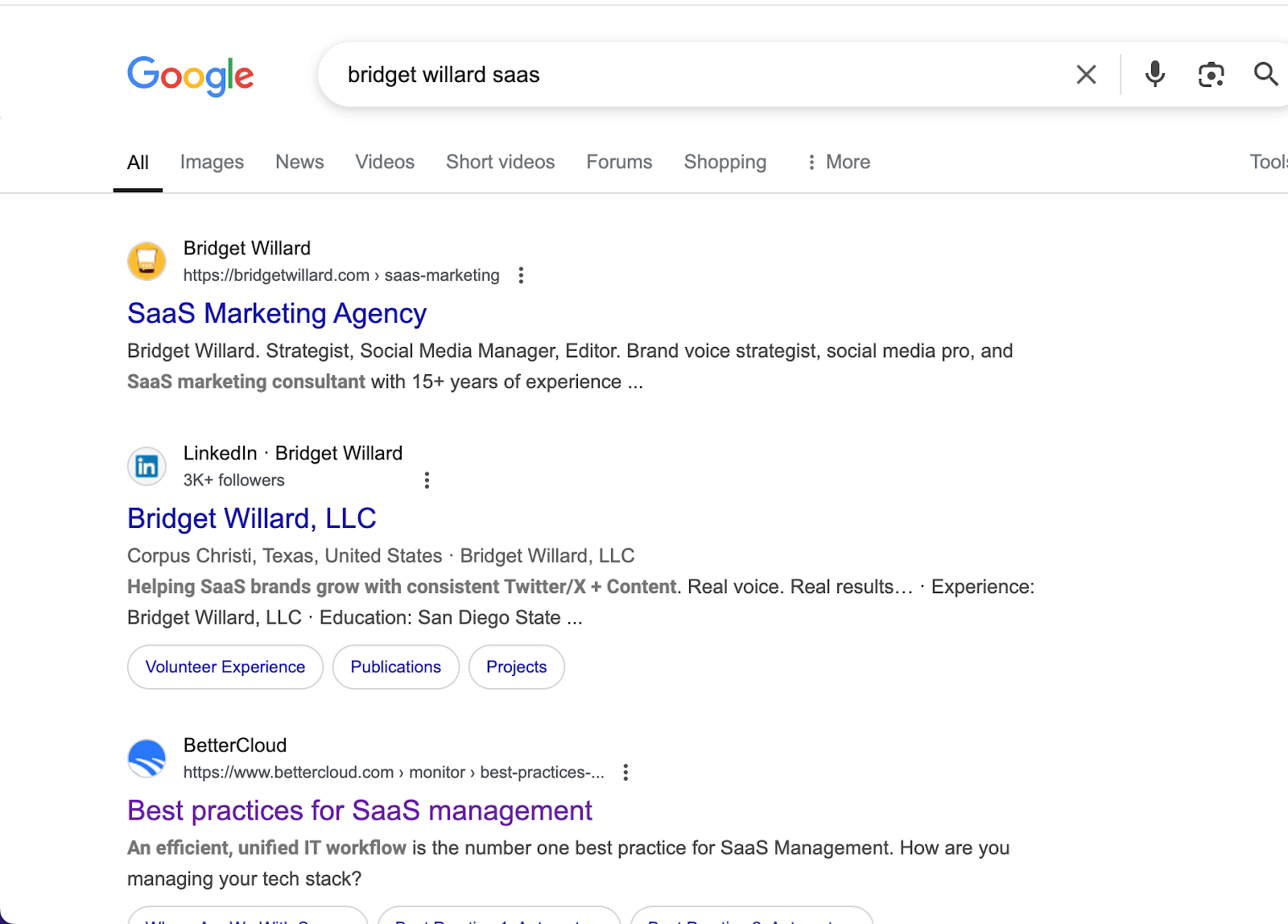
A simple “Bridget Willard SaaS” search shows my website first, then my LinkedIn profile, then an article I wrote for BetterCloud – a SaaS Management Platform. Incognito results were similar. The BetterCloud article was number 5 in the SERPS with my X profile (3) and Instagram profile (4) both ahead of it.
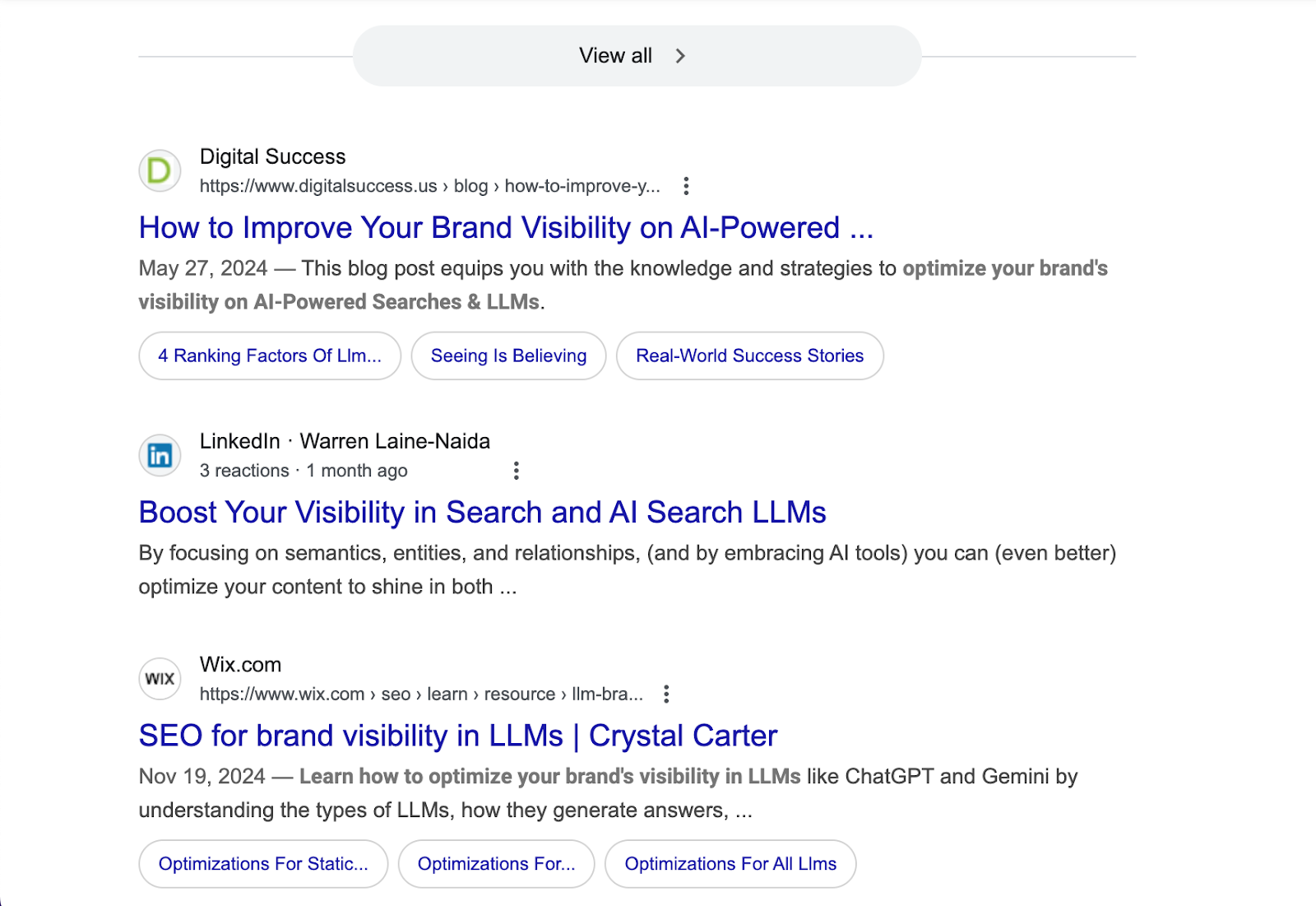
Warren Laine-Naida has consistently A/B tested publishing on LinkedIn versus his website. Every single time, these articles are on Page 1 of Google SERPs and his website version is “nowhere to be found,” he told me. Indeed, for the following set of articles, the LinkedIn one shows up as the second entry under videos for the phrase “boost visiblity in search llms.”
Oh yeah, articles on LinkedIn are indexed within 24 hours, too.
You don’t always need people on your website. Especially when 44% of all Google searches are for brand names. When you are a SaaS founder or Freelancer, your brand is your name. You both want and need customers and investors to follow you.
Get Marketing That Works
I’ve been helping SaaS companies build a name for themselves in the B2B space since 2015. My company offers the perfect SaaS Marketing Package to help your internal team. And, if you’re ready to have your LinkedIn posts repurposed as articles on LinkedIn, we can certainly make time for you.
SEO best practices are still best practices. If you have a product company (digital or physical) don’t just rely on your product pages. You need a blog.
It’s tempting to think blog posts are so 2013. Although with companies relying upon ChatGPT, Gemini, and other AI agents to write quick overviews and summary posts for (virtually) free, it’s surprising that product companies still don’t get it.
TL;DR: People searching for knowledge are sent to blog posts. People searching for action are sent to product pages.
Blogs Versus Short Video Dopamine Hits
Physical products like fashion and beauty heavily rely on influencers and affiliate marketing. Tech companies rely on affiliate marketing, too. Why? Other people market for you which means a lower cost for marketing and lower Customer Aquisiton Cost (CAC).
Relying on other people to do the work can be a good thing. Until TikTok shuts down and you have no content on your own website.
Snapchat introduced the short vertical video and TikTok capitalized on them – thanks to the pandemic. Short, vertical videos are now the new podcast. My Gen Z niece listens to TikTok videos with her earbuds for hours.
“Are you watching them?” I asked.
“Sometimes. I mostly listen when I vacuum and clean the apartment. Of course, you have to stop to swipe to see the next video.” (I’m surprised TikTok hasn’t changed that yet.)
Against biology (our eyes are made to scan right to left, left to right), every platform has this vertical, dopamine-inducing binge watch. Even LinkedIn has vertical video feeds now. (But that’s another rant.)
Relying upon third-party platforms for your marketing is a scary place to be.
If Amazon’s bid to buy TikTok is accepted, it’s going to become the modern Home Shopping Network. How’s that going to change the user experience? Want to binge on commercials? Unlikely. TikTok will become as annoying as over GIF-ed, loud MySpace pages.
If Amazon's bid to buy TikTok is approved, it's going to become the modern Home Shopping Network.
Yes. SEO best practices work as a whole to drive sales. Now, if your product pages aren’t optimized for PPC keywords, and you’re not running PPC ads, and you don’t have email marketing, and you don’t have blog posts to explain the why behind your products, then you have bigger problems.
This is a good time to say that unless you’re tracking your leads, you really don’t know how to attribute those leads. And, first-click leads? Those don’t exist.
Here’s another thing I say a lot: the internet is blind. Videos may have captions (or craptions if you don’t edit them) and photos may be beautiful, but search works from words.
You still need customers. And how do you get customers to find the thing you just built if they don’t even know it exists? There’s no keyword research for terms people aren’t using. Keyword research is mostly for PPC anyway.
I say this a lot on Twitter/X, LinkedIn, Facebook, and in videos. No one will search for you if they don’t know you exist. If you built a product no one knows exists yet (like the product by my new client Green Link), no one is searching for a baseboard for a chain-link fence. It just got patented, and the website went live in January 2025.
Do Blogs Still Work For Tech & SaaS Companies?
Yes, blogs still work for tech and SaaS companies. Now, if you’re a product company, you may be ignoring your blog in favor of product development, writing their pages and documentation. (I know you’re behind on documentation.)
You’re super excited about this new tool or feature you built. That’s awesome. Do you hear us saying, “but why” when we read your tweet? What use case does this apply to? What problem does this solve? Why do I want a project management tool inside of WordPress? But Why?
Well-written blog posts translate product pages into sales copy that answers the why. You can’t just post on X that you created a new tool with the link to the product page and expect sales (with or without lifetime deals).
The study by AN Digital found that if someone is looking for the best running shoes, they’ll be shown blog posts. If they’re looking for the best Nike running shoes, they’ll be shown a product page. What happens with Google also happens with ChatGPT.
SEO best practices haven’t changed. Modern SEO – being found in an AI search tool like ChatGPT – means you need to feed the machine.ChatGPT recommends real content by real experts. If you want to show up in AI-generated answers, an expertly-written blog post beats a static brochure site with product pages any day.
“Because ChatGPT relies both on pre-trained data and real-time web access, SEO becomes critical in ensuring a company’s content is visible and usable by the AI.” AN Digital
Get Marketing That Works
I’m a marketing specialist in the SaaS space. That means easy onboarding for you. Let’s translate the features and specs of your product into compelling marketing copy for your blog.
Editor’s note: I asked ChatGPT what they thought about Launch With Words — giving the pros and cons of it versus AI. This is what they came up with.
TL;DR: Pros and Cons
🚀 Selling Pros
Saves time – pre-written, ready-to-use blog content
SEO-friendly and structured for engagement
Easy for agencies to offer as an upsell service
One-time cost – no recurring subscription
Perfect for small businesses needing content fast
⚠️ Considerations
Not custom-written per client (requires minor edits)
Limited to available industry content packs
Higher upfront cost than AI-generated content
Best for specific industries – not all niches covered
Still requires client involvement for full personalization
Introduction
WordPress developers and agencies often face a common challenge: providing quality content for the websites they build. Fresh, relevant content is crucial for engaging visitors and boosting SEO, but writing blog posts for every client can be time-consuming.
Two emerging solutions can help: Launch With Words, a WordPress plugin that supplies ready-made blog content packs and prompts, and general AI content generation tools (like GPT-based writing assistants and WordPress AI plugins). This article compares Launch With Words with AI-driven tools across key factors – from content quality and SEO optimization to ease of use and cost – to help WordPress professionals choose the right fit for their workflow.
Content Generation Quality and Uniqueness
Launch With Words: This plugin delivers human-written content crafted by an experienced copywriter. For example, its premium “content packs” provide 12 draft blog posts (around 500+ words each) tailored to a specific industry
These posts come pre-formatted with proper headings, links, and even pull-quotes for a professional touch
The topics often address common customer questions in that industry, ensuring the content is relevant and useful to readers.
Because the content is written by a real writer with subject knowledge, it tends to be well-structured and engaging right out of the box. One consideration, however, is uniqueness – these packs are sold to multiple users, so the base content isn’t exclusive to one website. While there is no direct Google penalty for duplicate content, having identical posts as other sites can make it harder to rank since search engines must choose which version to show
Launch With Words anticipates this by encouraging users to customize the drafts for their locale and specifics ensuring each site ends up with a unique variation of the content. In terms of effectiveness, the human-written nature means the content is usually coherent and on-point, requiring minimal editing for clarity or tone.
General AI Tools: AI writing platforms (from standalone tools like ChatGPT to WordPress plugins integrating GPT-3/4) can generate content on virtually any topic. The quality of AI-generated text has improved dramatically – modern AI can produce readable, informative articles in seconds. Each output is unique, created word-by-word by the model, so you won’t get the exact same text as another user (which is a plus for originality).
AI can even adapt style and tone if instructed, yielding content that fits different brands or audiences. However, AI content quality can be inconsistent. Without careful prompting and oversight, AI might generate passages that are generic or factually off-base. Common issues include lack of deep context understanding, occasional inaccuracies, or a formulaic feel in the writing
These tools excel at producing a quick first draft, but that draft often benefits from human review and refinement to ensure nuance and accuracy. On the effectiveness front, AI can create content that performs well – for example, answering user queries or providing how-to advice – but its effectiveness largely depends on the user’s guidance. A well-structured prompt can lead to highly relevant content, whereas a vague prompt might result in fluff. In short, AI tools offer unmatched speed and originality, but the quality and effectiveness of their output hinge on skilled human input to guide and polish the content.
SEO Optimization and Integration
Launch With Words content is built with SEO-friendly practices in mind, though it doesn’t automate SEO the way a dedicated SEO plugin would. The provided blog drafts follow a sensible structure (with headings and logical flow) that aligns with good on-page SEO fundamentals
Topics like FAQs and seasonal posts are chosen to naturally include keywords and phrases potential customers might search for. In the free version, the monthly blogging prompts come with a checklist reminding users to add images, refine headlines, set categories, and include “your SEO bits” (keywords, meta descriptions, etc.)
This serves as a gentle nudge toward optimizing each post for search engines. The premium content packs, being more fleshed-out posts (~500 words each), are designed to be directly publishable and helpful to readers – which is exactly what search algorithms favor. Having turnkey, high-quality content ready means site owners can publish consistently (e.g. one post a month), signaling to Google that the site is active and relevant
However, because multiple sites may use similar base content, it’s wise to localize or expand the drafts to target your specific keywords or geographic area
This customization helps avoid any SEO clashes and lets you tailor posts to long-tail keywords for your niche. In summary, Launch With Words provides an SEO-friendly foundation (good structure and relevant topics) and encourages further optimization, but it doesn’t replace using an SEO plugin or strategy – it works best in tandem with your own SEO efforts.
General AI Tools: AI writing tools can be powerful allies for SEO – especially when paired with the right strategies. Many AI content platforms now integrate SEO features or can be instructed to follow SEO guidelines. For instance, some WordPress AI plugins offer built-in optimization tips or even analyze top-ranking content to guide the AI’s output
You can ask AI to include certain keywords, craft SEO-friendly titles, or generate meta descriptions automatically. In fact, popular WordPress SEO plugins like All in One SEO and Rank Math have begun incorporating AI to help generate optimized titles and meta tags based on the post content
AI can quickly suggest multiple title variations or identify relevant LSI keywords to sprinkle into an article. The advantage here is adaptability: if you need a blog post targeting a specific keyphrase, an AI writer can focus on that exact topic. That said, using AI doesn’t guarantee SEO success – the content still needs to meet Google’s quality criteria. Google has stated it will not outright punish or ban websites for AI-generated content as long as that content is helpful and not simply spam to game rankings
In practice, this means you should use AI as a helper to create genuinely valuable articles, rather than churning out keyword-stuffed text. One concern is that AI, if left unchecked, might produce subtly off-topic content or miss the intent behind a keyword. To counter this, some AI tools integrate with SEO analysis services (like Surfer SEO, Frase, or RankMath’s Content AI) to score and improve the content’s optimization.
WordPress developers using AI should still plan to review each AI-written piece for SEO essentials: ensure the keyword appears in key places, the content answers the intent, and internal links or calls-to-action are added as appropriate. In essence, AI tools can significantly streamline the SEO content process – from research to writing – but they work best under human guidance to make sure the end result aligns with a smart SEO strategy.
Ease of Use and User-Friendliness
Launch With Words: Simplicity is a major selling point of Launch With Words. It’s delivered as a standard WordPress plugin, which developers can install like any other. Once activated, the free version automatically creates draft posts for each month’s suggested topic (e.g. “October Draft Blog Post,” “November Draft Blog Post,” etc.). Users (or their clients) can click on these drafts, read the prompt or pre-written content, and then add their own touches or publish. The interface is just the familiar WordPress post editor – no new systems to learn.
In the premium content packs, the plugin acts as an importer that loads the ready-made articles (via a JSON file) into the site as draft posts
This means within minutes, a brand new site can have a full set of blog drafts waiting. For a WordPress developer handing off a site to a client, this is extremely user-friendly: the client finds a blog already populated with content they can review and publish on schedule.
There’s essentially zero learning curve for the end-user beyond basic WordPress editing. Setup is straightforward as well – no APIs, no external accounts. The most the developer might need to do is purchase a content pack file and use the plugin’s import feature, which is usually just a few clicks. In summary, Launch With Words is plug-and-play. It leverages the familiarity of the WordPress dashboard and keeps things simple, making it a hassle-free solution for both developers and non-technical clients to get content up and running.
General AI Tools: The ease of use for AI content tools can vary widely. On one end, you have web-based AI writers (like the ChatGPT interface or Jasper’s online app) which require copying the generated text into WordPress. While these tools are generally user-friendly, using them alongside WordPress is an extra step and might be daunting for non-tech-savvy users. On the other end, there are WordPress plugins that bring AI directly into the editor. For example, some plugins add an “AI Assistant” block or meta box where you can enter prompts and generate text without leaving the page
These integrated tools are improving in usability – often featuring simple “Generate Paragraph” or “Continue writing” buttons in the post editor. However, setting up AI in WordPress usually requires a bit more configuration than Launch With Words. Most AI writing plugins need an API key from a service like OpenAI which means the developer has to sign up for that service and possibly incur usage costs. There might also be settings to tweak (choosing AI model, adjusting creativity level, etc.) which introduce complexity. Additionally, effectively using AI involves learning how to craft good prompts. A WordPress developer might adapt quickly to this, but a typical client might find it confusing at first (“What do I ask the AI to get a good blog post?”).
Documentation and support vary by tool – some plugins have in-editor tips and predefined prompts to help users, which is great for ease of use. Overall, while AI tools are becoming more user-friendly (and many are directly integrating into familiar workflows), they still demand more active involvement from the user.
There’s a bit of experimentation and learning required to consistently get great results. In contrast to the one-click content of Launch With Words, using AI feels more like a new creative process to learn. For a developer willing to invest time, this process can become quite smooth, but for handing off to a less technical client, it may require training or a managed approach (e.g., the developer uses the AI tool to prep content for the client, rather than the client doing it themselves).
Cost and Value Proposition
Launch With Words: The cost structure of Launch With Words is straightforward. The base plugin (with the year’s worth of monthly blog prompts) is free, which provides value in the form of guidance and structure but not full content. The real content comes from purchasing industry-specific packs. These premium packs carry a one-time cost – for instance, the first pack (for roofing contractors) is priced around $497 for 12 ready-made posts
That comes out to roughly $40 per post for professionally written, niche-specific content delivered to your site. Additional packs (for other industries like general contractors, etc.) are similarly priced, and the creator has mentioned possibly offering smaller packs of prompts at around $97
For WordPress agencies, these packs are a one-time investment per client/industry. The value proposition is that a developer can buy a content pack and pass the cost to the client as part of the project (potentially marking it up as a service of populating their blog).
In many cases, this is still cheaper than hiring a freelance writer to produce 12 custom articles, which could run several hundred dollars in total for equivalent quality.
It’s also a time saver – the content is available immediately, whereas writing from scratch (even when outsourced) takes time and project management. That said, $500 per site is a significant upfront expense, especially for smaller projects or tight budgets. If a developer only occasionally needs one or two posts, buying an entire pack might be overkill.
The free version’s prompts could guide the client to write content themselves (at no cost), but that shifts effort back to the client. In terms of overall value, Launch With Words offers high-quality content for a premium price.
Agencies serving a specific niche might find it cost-effective – e.g. pay once for a pack and use it (with modifications) for multiple clients in that niche – though they should be cautious about identical content across clients. For individual site owners or developers with diverse clients, the à la carte pricing means you pay only for what you need, but you might not find a pack for every scenario. There’s no ongoing subscription fee for the plugin; the costs are one-time content purchases, which is attractive if you plan to reuse the site indefinitely with that content.
General AI Tools: AI writing tools range from completely free options to premium SaaS subscriptions, so cost can scale with usage. Many WordPress developers might start with ChatGPT, which currently offers a free tier and a Plus subscription at $20/month for faster, more reliable access
At $20 a month, a developer could generate content for multiple client sites, making it extremely cost-efficient per article (just pennies in computing cost for each blog post generated). Other AI writing platforms like Jasper, Copy.ai, or Writesonic typically use a monthly subscription model. For example, Jasper’s plans start around $49/month for an individual creator account which allows unlimited word generation and additional features. Team plans can be over $100/month for multi-user collaboration
If a WordPress agency subscribes to such a service, they can leverage it to produce content for dozens of projects, getting a lot of bang for the buck. Moreover, some WordPress AI plugins are free to install but require an OpenAI API key – in those cases, the cost is pay-as-you-go for usage. OpenAI’s API is relatively inexpensive (e.g., a few cents for a typical blog post’s worth of tokens), meaning even heavy usage might amount to only tens of dollars per month.
In weighing value, AI tools have a lower cost per piece of content compared to purchasing pre-written packs or hiring writers. However, one must factor in the human time involved. AI can create a draft in minutes, but a developer or content editor will spend time refining that draft. Time is money – if a quick edit suffices, it’s still a net gain, but if each AI article needs significant rewriting, the effective cost rises.
Another consideration is subscription commitment: with Launch With Words you pay once and own the content pack, whereas with AI software you pay continuously for access. If you cancel an AI subscription, you lose the tool (though you keep any content you already generated).
For a developer who constantly needs new content across different topics, an AI tool subscription might be the most economical choice. It provides flexibility to generate anything, anytime, under a predictable monthly fee. On the other hand, if content needs are limited and specific (e.g., one site, one industry, 12 posts needed), a one-time content pack purchase could be a better value than several months of an AI service.
Ultimately, AI tools are very cost-effective for scaling content production, but Launch With Words can be cost-effective for high-quality targeted content without ongoing fees – it depends on the scope of your content needs and how you budget time vs money.
Effectiveness in Scaling Workflow
Launch With Words: From a scaling perspective, Launch With Words acts like a force multiplier for WordPress developers who want to deliver more than just a bare-bones website. By having a bundle of blog posts ready to go, a single developer can significantly reduce the time spent on content creation per project.
This means you can launch websites faster or take on more clients without worrying about writing content from scratch for each one. It’s particularly effective for agencies focusing on certain verticals: if you frequently build sites for, say, roofing companies or real estate firms, you can standardize a process where each new site gets a relevant content pack.
That’s essentially a year’s worth of blogging done in minutes for each client. Clients benefit by seeing immediate value – their new site isn’t empty; it’s populated with information that can engage their audience and even drive traffic. According to Bridget Willard (the creator of Launch With Words), having this turnkey content ready means businesses have more material to share on social media and a better shot at SEO, since their site will consistently publish useful articles
This helps agencies demonstrate quick wins for clients (like improved web presence and SEO signals), which in turn can make for happier, long-term client relationships. In terms of scaling within an agency, there’s minimal overhead to using Launch With Words. One person can import the content pack and do light customizations (swap in the client’s business name, tweak any region-specific details) and be done. The limitation, of course, is that you’re scaling breadth but not depth of content – each site gets roughly the same set of 12 posts (with minor edits). If all your clients expect completely unique content strategies, this approach wouldn’t scale in that scenario.
But for many small business clients, a set of informative, generic-yet-customizable posts is “good enough” to establish their blog. So, Launch With Words lets you scale the content delivery efficiently, though not necessarily the content variety across clients (unless you have many different packs).
General AI Tools: When it comes to scaling content production, AI tools are incredibly powerful. They enable a developer or agency to produce content at a volume and speed that would be impractical manually. For example, with the right prompts or templates, an AI system could generate dozens of blog post drafts in a day – something that would normally require a team of writers. This is further enhanced by features some AI-driven WordPress plugins offer, like bulk content generation. Imagine inputting a list of topics and having the AI create a draft for each one automatically
Some tools provide a “bulk content builder” interface where you can queue up multiple titles or questions and have the AI churn out posts for each.
This level of automation allows agencies to scale their content offerings dramatically. A small content team armed with a good AI workflow can serve many more clients or publish far more frequently than before. Moreover, AI can help scale other content-related tasks: generating social media captions, product descriptions, page copy, etc., all within one platform, which adds to operational efficiency.
However, scaling with AI isn’t just a push-button utopia – the effectiveness of this scale depends on maintaining quality control. It’s easy to generate a lot of words; it’s harder to ensure those words truly benefit the client’s goals. Agencies that successfully use AI at scale usually implement a review process: human editors or strategists check the AI output, ensure it aligns with the client’s voice and factual needs, and optimize it as needed.
The good news is that even with review time, content creation throughput is much higher than without AI. Another way AI aids scaling is by handling repetitive or boilerplate content. For instance, if an agency manages 50 local business websites and needs a “Happy Holidays” post or a service description for each, AI can produce variants of that content quickly, freeing the team to focus on more strategic work. In summary, AI tools are extremely effective for scaling up content work – they reduce the bottleneck of writing. The agencies that stand to gain the most are those that handle large volumes of content or need to cover a wide array of subjects on a tight timeline
As long as quality oversight is in place, AI allows WordPress developers and content teams to serve more clients and publish more content without a linear increase in headcount.
Flexibility and Customization
Launch With Words: The content from Launch With Words is designed to be adaptable, but it has predefined boundaries. Each content pack is tailored to a specific business category (like roofing, HVAC, etc.), which means the topics and tone are chosen to fit a generic business in that industry. Developers and site owners are encouraged to customize the drafts to fit their exact business. In practice, this might involve inserting the company’s name, adding details about the company’s services or local area, and adjusting any wording to match the brand’s voice.
Because the content is delivered as regular WordPress posts (in draft), users have full control to edit them as much as needed. The writing style out-of-the-box is generally conversational and small-business-friendly; if a client prefers a more formal or quirky tone, the developer would need to revise the text to reflect that.
The flexibility is there in the sense that nothing is locked – it’s like getting a ghostwritten article that you can modify freely. However, Launch With Words won’t automatically adapt the content for you; it provides the starting point. Another aspect of flexibility is content breadth: if a client’s business has unique services or a niche focus not covered by the pack, you might need to create additional content beyond what’s provided.
The plugin itself doesn’t generate new topics – you get what’s in the pack. This is where some users might mix approaches (e.g. use the 12 provided posts, then write or generate a few more on specialized topics to round out the blog). In terms of accommodating different business needs, Launch With Words excels when the business squarely fits an available content pack, and it allows moderate customization within those posts. It’s less flexible if the business type is uncommon or if the client needs very specific content angles – in those cases, you’d have to supplement with custom writing.
On the whole, Launch With Words offers a semi-custom solution: it covers common ground for an industry and leaves the fine details to you.
General AI Tools: AI content generators shine in customization and flexibility. Since an AI doesn’t have a fixed set of outputs, you can tailor your prompts to produce content for virtually any business type, any topic, and any style. This means whether you’re building a site for a florist, a tech startup, or a bilingual non-profit, an AI tool can help create content suited to that context. With the right instructions, you can set the tone (e.g. “write in a friendly, informal voice” or “use a professional and technical tone”), adjust the complexity (maybe simpler language for a broad audience, or more jargon if writing for experts), and include specific details (“mention our 30 years of experience and our free consultation offer”).
The AI will incorporate these into the content as directed. This level of customization is something a fixed content pack cannot offer. Additionally, AI can generate different types of content on the fly – not just blog posts, but also FAQ sections, product descriptions, listicles, or even code snippets for a developer blog, all within the same tool. For WordPress developers, this means an AI assistant can adapt to various content needs across different projects. Another form of flexibility is language and length: you can request content in different languages or quickly get a shorter/longer version of a piece, which is useful if you need, say, a snippet for a homepage and a full article for the blog.
The flipside of this flexibility is that it relies on the user’s ability to articulate the requirements. If the prompt or guidance to the AI is too generic, the output might also be generic. Achieving a truly custom-feeling piece might take a couple of iterations (e.g., “that’s close, but add a paragraph about X and use a more playful tone”).
Thankfully, many AI tools allow refining the output easily by either editing the prompt or directly instructing the AI further. In summary, general AI tools offer maximum customization potential – they’re like a very talented but direction-following writer who can create whatever you ask, provided you give clear instructions. This makes them incredibly flexible for different business needs, far beyond what a one-size-fits-many content pack can do.
Automation vs Human Input Balance
Launch With Words: With Launch With Words, the balance tilts strongly towards human input on the content creation side, with automation handling the delivery. The blog posts and prompts you get are written by human copywriters (with expertise in marketing and the specific industries). This means the nuance, creativity, and context come built-in from a person – something AI sometimes struggles with.
There’s little risk of bizarre AI-generated errors; the facts and tone have been vetted by the writer. Once you have the content pack, the process becomes semi-automated: the plugin imports the content as drafts for you, saving you the manual labor of creating each post. From that point, human input comes back into play for any customization or updating of the content. In terms of oversight, you might do a quick read-through of each draft to ensure it aligns with the client’s voice and is up-to-date (for example, if a post references “this year” or a trend, one should check it’s still relevant).
But generally, you can trust that the content is publication-ready or very close to it because it’s human-written and reviewed. The overall approach is automation-assisted human content – humans create the material, and the plugin automates its distribution into your site. This balance works well for developers who want to minimize time spent but don’t want to sacrifice the human touch in the writing. It also means less ongoing oversight is required compared to pure AI generation; you’re not going to find nonsensical sentences or made-up facts in a Launch With Words pack, whereas those are things you’d watch for with AI. The trade-off is that you’re limited to content humans have pre-written (which is finite) and you rely on their expertise for each topic.
General AI Tools: AI content creation is heavily automated, but to use it effectively, human involvement remains crucial. These tools can autonomously produce text, which might give the impression that you can “set it and forget it.” In reality, achieving high-quality results is a collaborative process between the AI and the user. The user (developer or content writer) provides the initial input – a prompt or set of guidelines – and the AI generates the output.
Often, the first draft from the AI will need human editing for polish. It’s a bit like having an apprentice: the AI does the bulk of the drafting work very quickly, but a human mentor needs to check that work. Commonly, users will refine the AI’s output by instructing it to fix certain sections, or they’ll manually edit the text to add a personal anecdote, correct a nuance, or ensure factual accuracy. This interplay is important because while AI is excellent at generating content, it lacks true understanding – it might confidently assert something that isn’t true, or use a tone that’s slightly off for the context
Human oversight catches and corrects these issues. In fact, a recent marketing survey found that 90% of marketers believe human editing significantly improves the quality and credibility of AI-generated content
That statistic underlines the industry consensus: AI is a powerful aid, but not a replacement for human judgment. The balance then is using automation to save time and brainpower on the first draft and routine writing, and then applying human insight to refine and fact-check.
Over time, as trust in the tool grows and one develops better prompting techniques, the need for heavy editing might decrease – but a human will always set the direction and ensure the output meets the needed standards. Also, from an ethical and strategic standpoint, humans need to guide AI on what content is appropriate and aligns with brand values; an AI left completely unchecked could stray from the desired messaging. Some AI integrations allow scheduling or one-click publishing of generated content, but it’s generally advisable not to publish without a human review in the loop.
In summary, AI tools represent automation with a safety net – they automate the writing, while humans provide the quality control and strategic thinking. The best outcomes arise when you view AI as a collaborator: let it do the heavy lifting, but always give the final say to a human editor or developer.
Conclusion and Recommendations for Use Cases
Both Launch With Words and general AI content tools offer compelling ways to tackle the content needs of WordPress projects, but they serve different strengths. The right choice depends on your specific use case, resources, and priorities as a WordPress developer or agency.
Launch With Words is ideal for developers or agencies who want a plug-and-play content solution with minimal fuss. If you’re frequently launching sites for small businesses in common industries (like contractors, real estate, home services, etc.), Launch With Words can jump-start those sites with a baseline of high-quality blog content. The content packs shine when you need reliable, well-written articles that you can trust (almost) immediately. This is great for scenarios where you might not have a dedicated content writer, or the client’s budget doesn’t allow for bespoke writing but they still expect the site to have some substance. It’s also a good fit when consistency and quality are more important than quantity – for example, a client will be happy with one post per month as long as it’s well done. The upfront cost can often be built into your project pricing. Agencies have even found they can recoup and profit from the packs by packaging the provided content as part of a premium “blog setup” service for clients. However, Launch With Words might not cover every niche, and if you have a very unique client, you could find its content packs not directly applicable. In such cases, or if the client requires a very specific voice, you’d lean on traditional writing or AI to supplement. Think of Launch With Words as a time-saving content foundation – you get solid groundwork that you can then tweak to perfection.
General AI tools are the go-to choice for flexibility and scale. If your work involves a broad range of topics or you need to produce a large volume of content regularly, AI writing assistants are incredibly useful. WordPress developers who also handle content marketing, or agencies offering ongoing blog writing services, will appreciate how AI can accelerate content production. AI is also a strong choice if you need content types beyond just blog posts: you can generate copy for landing pages, product descriptions, meta tags, even code explanations, all with the same tool. For example, if a client suddenly needs 5 new blog posts about different aspects of their business within a week, an AI tool can make that achievable without pulling all-nighters. The cost of AI tools, relative to output, is generally low – so for budget-conscious projects where hiring multiple writers isn’t feasible, AI provides a viable alternative. That said, to get the most out of AI, you or your team should be willing to invest time in the editorial process. These tools pay dividends when you refine their output; if you’re looking for a completely hands-off approach, AI alone isn’t it. But in the hands of a savvy WordPress developer or content editor, AI content generation can be molded to fit each client like a glove. Also consider the client’s perspective: some clients might be uneasy with the idea of “AI-written” content, while others don’t mind as long as it’s good. It’s often wise to position AI-assisted content as still being reviewed by a human (which it should be). In use cases where hyper-custom content or rapid turnaround is required, AI is the recommended path.
Blending both solutions: It’s worth noting that Launch With Words and AI tools aren’t mutually exclusive. A WordPress developer could use Launch With Words to quickly furnish a new site with a set of starter posts (ensuring the blog isn’t empty at launch), and then use AI tools to generate additional articles over time, or to update and expand on the provided content. For instance, if a Launch With Words pack includes a 500-word article on “Benefits of HVAC Maintenance,” an agency could later use AI to create a 1,000-word in-depth guide on the same topic or a related one, thereby complementing the initial content. Similarly, one might use AI to localize a generic pack further (“Add two sentences in this blog post about why this topic matters to homeowners in <CityName>”). This combined approach leverages the strengths of both: the professional quality and structure of human-written packs, and the infinite adaptability of AI for new or niche content needs.
Final recommendations: For WordPress developers evaluating content solutions, start by assessing your typical project needs. If you often build sites in well-defined niches and prefer a turnkey content offering that integrates seamlessly into your launch process, give Launch With Words a close look. It can significantly enhance your deliverable (clients love seeing a blog ready to roll) with very little ongoing effort on your part.
On the other hand, if your content requirements are more diverse or you aim to offer content creation as an ongoing service, investing in an AI writing workflow could be more beneficial. The AI route requires more involvement and editorial skill, but it offers unparalleled versatility. Many agencies might find value in using Launch With Words for what it provides and relying on AI for everything else beyond that. In all cases, remember that quality content is still king – whichever tool you use, plan to review and polish the output to meet the high standards of today’s web. By leveraging these tools appropriately, WordPress developers can dramatically scale up their content game, providing better service to clients and reducing the bottleneck that content often poses in website projects.